Bridging physical steel with critical path scheduling
How I integrated warehouse dock receipts as first-class scheduling dependencies, engineered inventory supply pooling, anchored Gantt backward passes to expose contractual delivery risk, and proved Design System v1.0.0 across 31 production files.
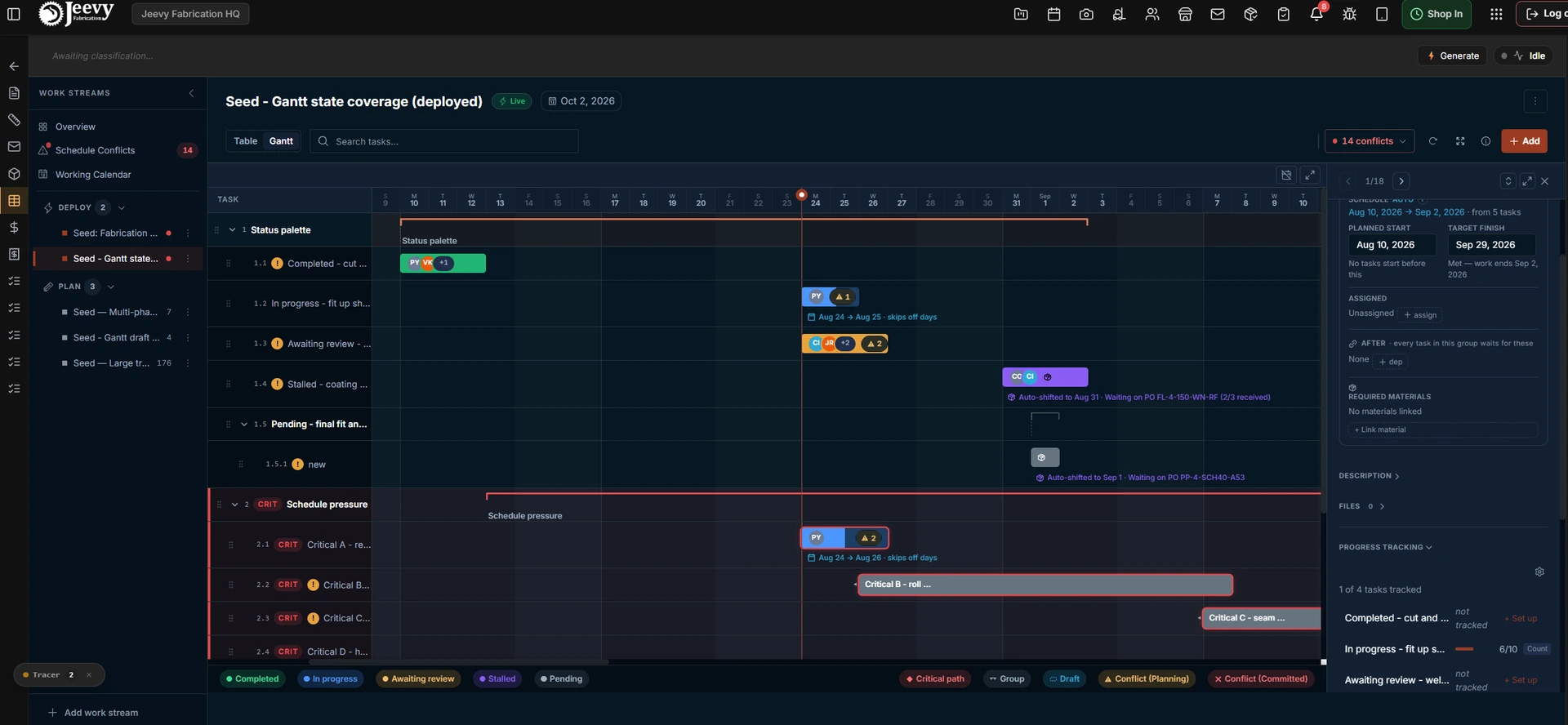
The production Gantt scheduling engine: material-gated purple stalled bars annotated with the delivery they are waiting on, active azure workstreams, and a crimson critical path chain under delivery pressure.
When a schedule ignores the flatbed truck
In heavy industrial manufacturing, scheduling tools frequently operate in corporate fiction. Traditional Gantt software places tasks based solely on typed calendar dates and task dependencies, assuming raw materials and hardware exist out of thin air.
On the hangar floor, that assumption created daily operational friction.
Phantom start dates
The timeline claimed a crew could begin welding a 40-foot skid on Monday morning while the required structural steel was still on a vendor truck outside Dallas.
Supply over-allocation
Multiple coordinators claimed the same 10-unit purchase order with no inventory pooling, so two separate teams believed they had parts only one would receive.
Moving target distortions
Float was calculated against whichever task finished last, so arbitrary end tasks were highlighted as critical while real slips against client delivery milestones stayed masked.
Destructive subtask grouping
Adding a subtask to an active job converted the row into a generic container, silently breaking its linked material constraints and its task history.
I redesigned the scheduling engine to make physical warehouse deliveries a first-class scheduling predecessor, synchronising dock receipts directly with the active project timeline.
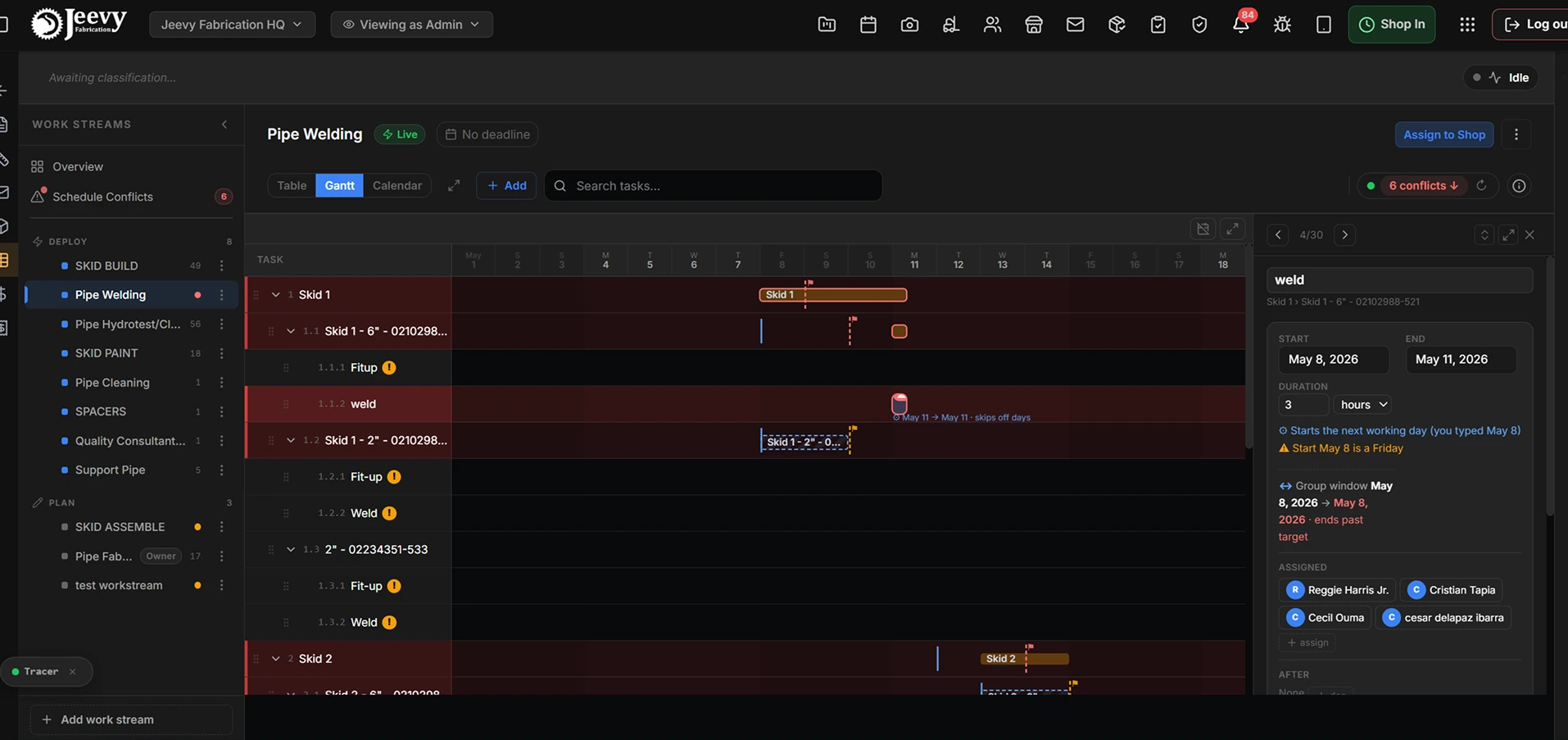
The legacy Gantt view: un-gated start dates, detached bar captions, and arbitrary critical path highlights with no link to inventory.
Proving Design System v1.0.0 on our densest operational surface
Before rolling the design system across the entire OS, the Tasking module served as the end-to-end pilot migration, 31 production files in all. It was the right proving ground precisely because it is the densest interface in the platform: a thousand rows of real project data will find a spacing rule that a static frame of six rows never will.
Testing on live datasets surfaced physical constraints that no amount of review in a design file could have caught.
The glowing card
Rest surface loweredResting overview cards sat too bright, rendering as an array of glowing blue slabs that washed out the conflict warnings sitting on top of them. Worse, rest was brighter than hover, so a card dimmed when you pointed at it. Recalibrating the resting surface one step darker restored a natural lightness ladder and let cards lean on a crisp 1px sand border instead of on brightness.
Table row bloat
40px to 28px actionsLarge 40px action buttons inflated dense data rows and broke the vertical scanning rhythm down the column. Row actions were standardised to the 28px small variant, backed by an invisible 44px hit boundary so the density costs a gloved operator nothing.
Decorative monospace
Numeric steppers onlyFixed-width type had spread across ordinary interface copy as a texture rather than a signal. Human reading unified on the sans-serif stack, with fixed-width formatting isolated to numeric steppers, where equal digit widths stop the number jittering as a count changes.
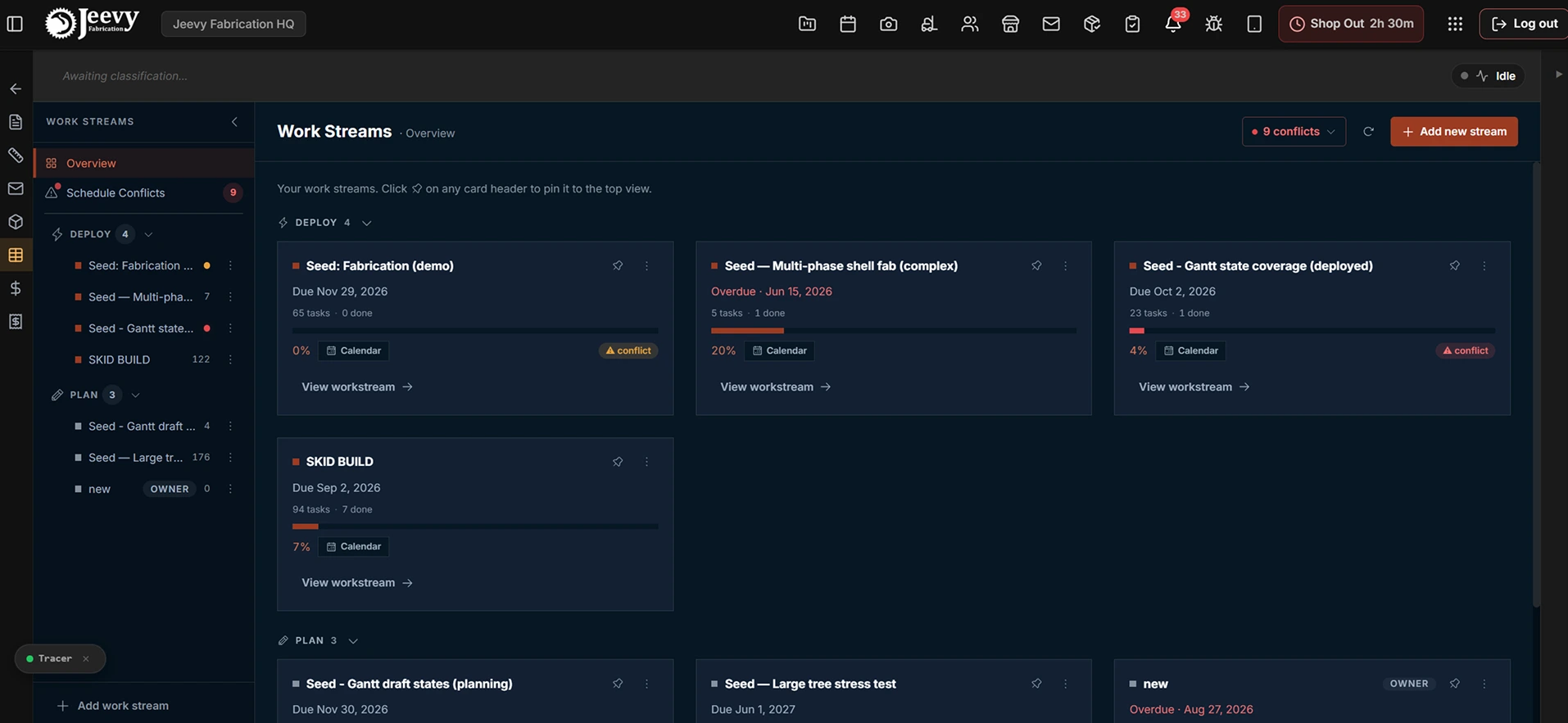
Production work streams overview: resting cards recede into clean dark surfaces with 1px sand borders, de-escalated action hierarchies, and pinned health sentinels.
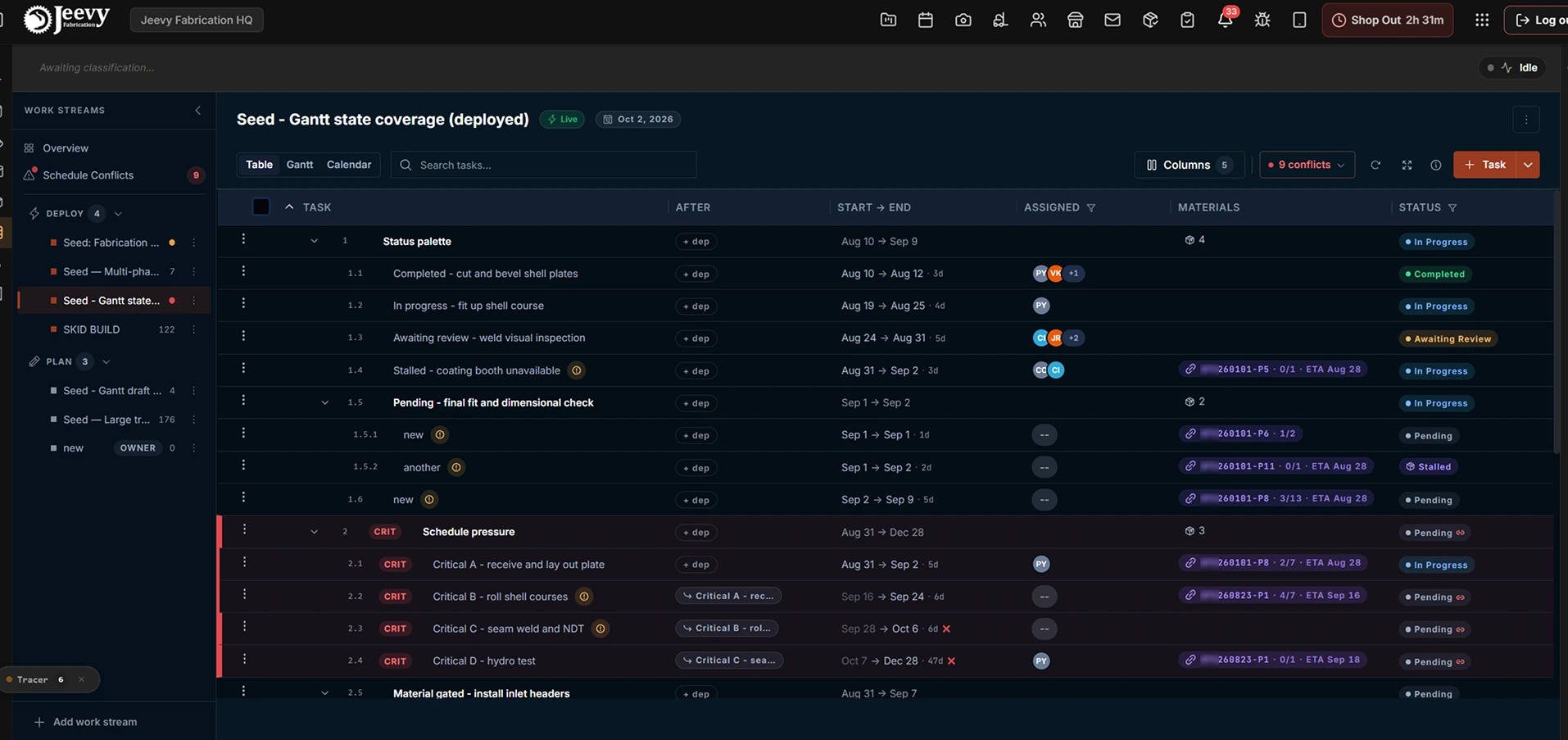
Production tasking table view: dense 28px row actions, inline material chips carrying the delivery and its received ratio, and hierarchical tree nesting.
Subtask gating and container integrity
Once a task is live, whether it is in progress, stalled, awaiting review or complete, it can no longer be converted into a group. Only work that has not started can become a container. That single rule is what prevents split labour timers and orphaned material allocations.
The four-day calendar and status purple
The shop-floor anchor respects the facility's Monday through Thursday schedule, so a Friday delivery schedules the earliest weld for Monday morning. Purple stays quarantined to material dependencies and is never permitted on a standard interface button.
The shop-floor anchor and automated status lifecycles
To guarantee that work cannot be scheduled before physical parts arrive, a task’s earliest start is bounded by four operational constraints: its planned dates, its preceding tasks, its vendor delivery dates, and the shop-floor anchor. The latest of the four wins, because a constraint that can be overridden is not a constraint.
The shop-floor anchor. If a task’s planned start has already passed while it sat waiting on delayed materials, an arrival today cannot revive an expired date in the past. The system snaps earliest fabrication forward to the active work shift, which is the only date a fitter can actually act on.
Plant working calendar awareness. The anchor respects the facility’s four-day schedule, Monday through Thursday, so a Friday delivery schedules the earliest weld for Monday morning rather than for a day nobody is in the bay. The timeline says so on the bar itself rather than leaving the coordinator to work out why a date moved.
Status purple isolation. Purple is quarantined strictly as a material dependency indicator, powering the package badge, the purchase order tag and the stalled timeline bar. It is never allowed on a standard interface button, so a coordinator scanning a wall-mounted timeline can find every material blocker without reading a word.
Purple is the one hue with a hard reservation: it means material, and nothing else. It appears on the package micro-badge, the PO indicator, and the stalled bar, so a coordinator scanning a wall-mounted timeline can find every material blocker without reading a word.
Available-to-promise pooling and progressive disclosure
A purchase order line is a finite pool, but the legacy system let every task claim against it independently. Two coordinators could each allocate the same eight units and both believe they were covered until the truck arrived. I implemented an available-to-promise model that calculates unallocated stock in real time, deducting every other task’s claim before it will accept a new one.
The arithmetic was the easy half. The harder half was showing it without turning every row into a spreadsheet, so the material link modal was rebuilt around progressive disclosure: fast to scan by default, complete on demand.
Clean primary scannability. Each line shows only what an operator needs to decide: the part title, the shipping status such as In-transit · ETA Aug 28, the allocated ratio 1 / 3, and a single link trigger. Everything else is one interaction away.
The over-allocation lock. When a line is fully committed elsewhere, the stepper locks to 1 / 0 and the row says so in plain words, fully allocated, nothing left to link, with the trigger disabled. A disabled control that does not explain itself is just a bug the user cannot report.
Claimant popovers on demand. Clicking an allocation ratio opens the breakdown: total ordered, what has actually landed at the dock, the unallocated balance, and the specific tasks currently holding units. That last part is what turns a refusal into a negotiation, because the coordinator who is blocked can now see exactly who to go and ask.
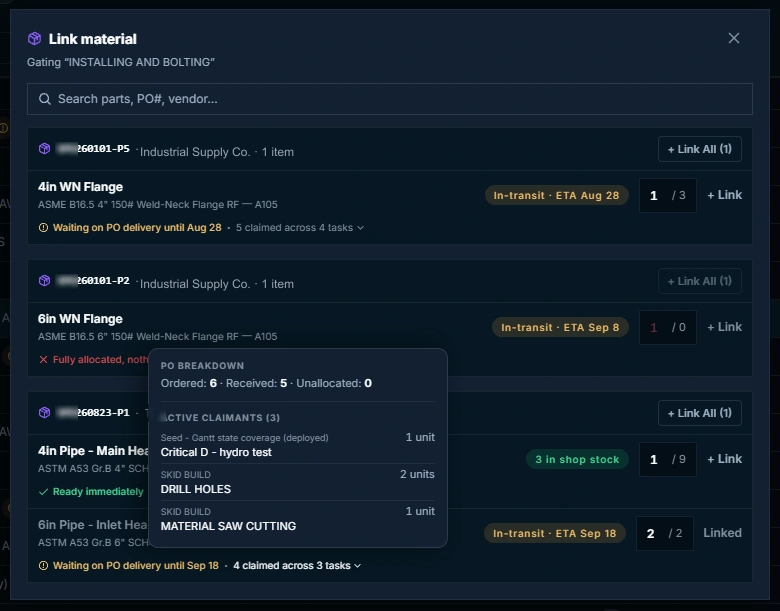
The material link modal: progressive disclosure showing clean 1 of 3 allocations, a fully-allocated lock, and an interactive claimant breakdown naming the three tasks currently holding units.
Non-destructive subtask grouping and drawer cards
In legacy tasking systems, adding a subtask to an active job converted the row into a parent container and permanently destroyed its material links and dependencies. Which meant the safest thing a coordinator could do with a live task was leave it alone.
Live constraint re-pointing. When a task becomes a parent group, its material links and predecessor dependencies transfer automatically to the first subtask, preserving allocated quantities and history rather than recreating them. Nothing is dropped, so nothing has to be re-entered.
Dynamic rollup envelopes. The parent derives its timeline from its children, spanning the earliest child start to the latest child finish, so a summary bar can never contradict the work underneath it.
Inside the task inspection drawer, material items render as structured state cards rather than flat text tags. A tag reading “pending” tells a coordinator nothing they can act on. A count and a date do.
Requirement met
2/2Full quantity verified against warehouse inventory. The task carries no material floor, so its earliest start falls back to its predecessor and calendar constraints.
Partially received
1/2An in-transit indicator showing the outstanding quantity and the vendor ETA. The floor holds at the ETA of the last outstanding line, not the first.
Slipped delivery
ETA movedThe revised vendor ETA with the superseded baseline struck through beside it. A coordinator can attribute the slip to a vendor without opening the purchase order.
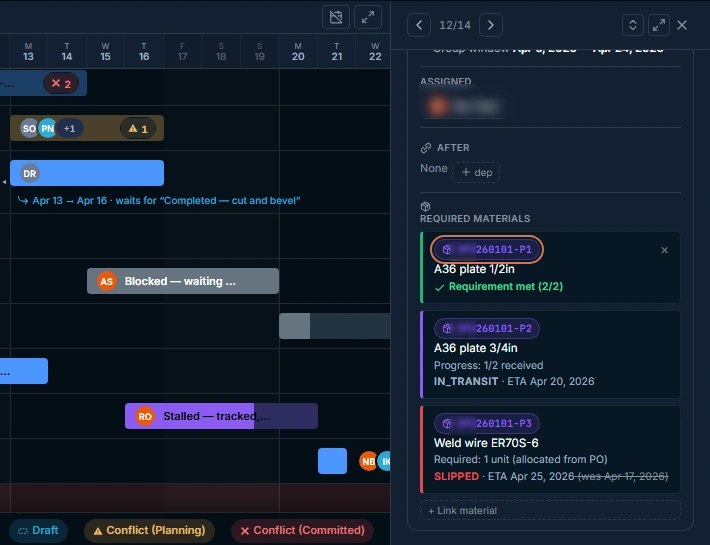
Task inspection drawer with structured material cards: requirement met at 2 of 2, an in-transit partial receipt at 1 of 2, and a slipped vendor ETA with the superseded baseline date struck through beside it.
Exposing true negative float against contractual launch pad delivery deadlines
Traditional project management algorithms calculate float relative to whichever task happens to finish last. In aerospace fabrication that produces a dangerous blind spot: the algorithm moves the goalposts as the work slips, masking the upstream delays that threaten a fixed customer delivery date.
I redesigned the backward pass to anchor directly to the workstream target delivery milestone. The deadline is fixed by contract, so the arithmetic should treat it as fixed.
True negative float. When an assembly chain slips past its contract delivery date, float drops below zero and the entire delayed sequence renders in crimson, making schedule pressure obvious at a glance. The value is not clamped, because a chain four days late and a chain one day late need different responses.
Honest slack representation. When work is comfortably ahead, the timeline displays zero critical path pressure rather than arbitrarily colouring the final task red. An indicator that is always populated teaches people to ignore it.
Automatic graph recalculation. Any delivery date change logged by purchasing updates downstream floats across the active project graph in real time. A vendor email at four in the afternoon moves the timeline before anyone has opened it.
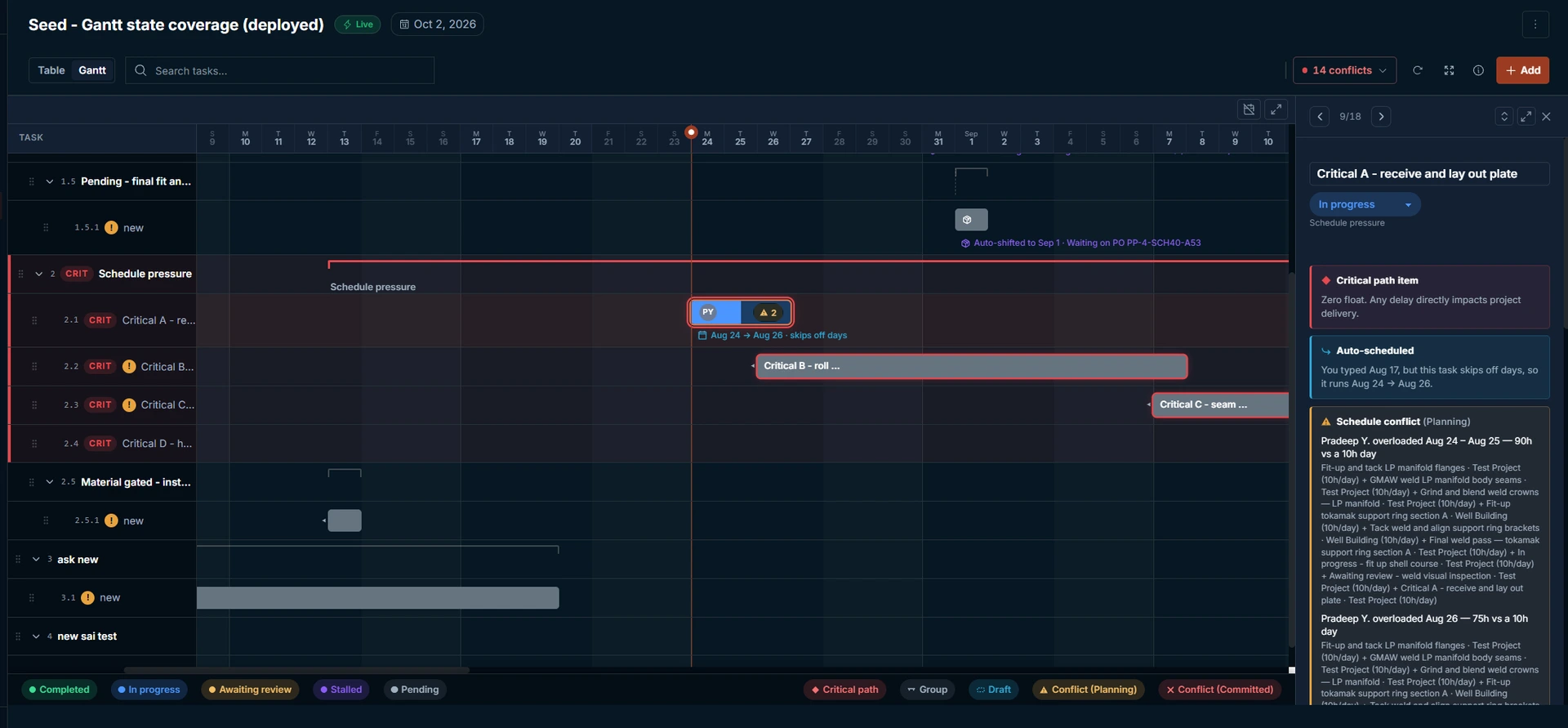
Critical path schedule pressure: the backward pass anchored to the workstream target deadline, with the drawer stating the consequence rather than the metric, and bars annotating why each of them moved.
Verified Outcomes
- 100% physical material gating. Phantom start dates eliminated by flooring task readiness against verified dock receipts.
- Zero supply over-allocation. Available-to-promise pooling structurally prevents duplicate inventory claims across simultaneous workstreams.
- Non-destructive grouping. Re-pointing constraints on subtask creation eliminated orphaned material links and broken dependency chains.
- 31 production files migrated. Design System v1.0.0 validated in production, eliminating table row bloat and unmapped styling debt.
Scheduling without physical inventory is fiction
The core insight of Engine 05 was proving that scheduling software cannot live in isolation from the shop floor and the warehouse. Every failure in the legacy system traced back to the same root: the timeline had no channel through which physical reality could reach it.
When vendor delivery slips, dock receipts and piecework progress are embedded directly into the scheduling graph, the Gantt chart stops being a decorative presentation of the plan and becomes an authoritative industrial operating tool. The same instinct runs through the materials and procurement ledger ↗, where the constraint was the receipt rather than the schedule.