Architecting the Single-Table Materials Ledger & Spend Governance
How I eliminated an un-audited $800k Google Sheet and replaced an unstable 1,078-line React monolith with an append-only PostgreSQL ledger, dynamic spend gates, 4-step unit QC, and 1-to-N bulk plate nesting.
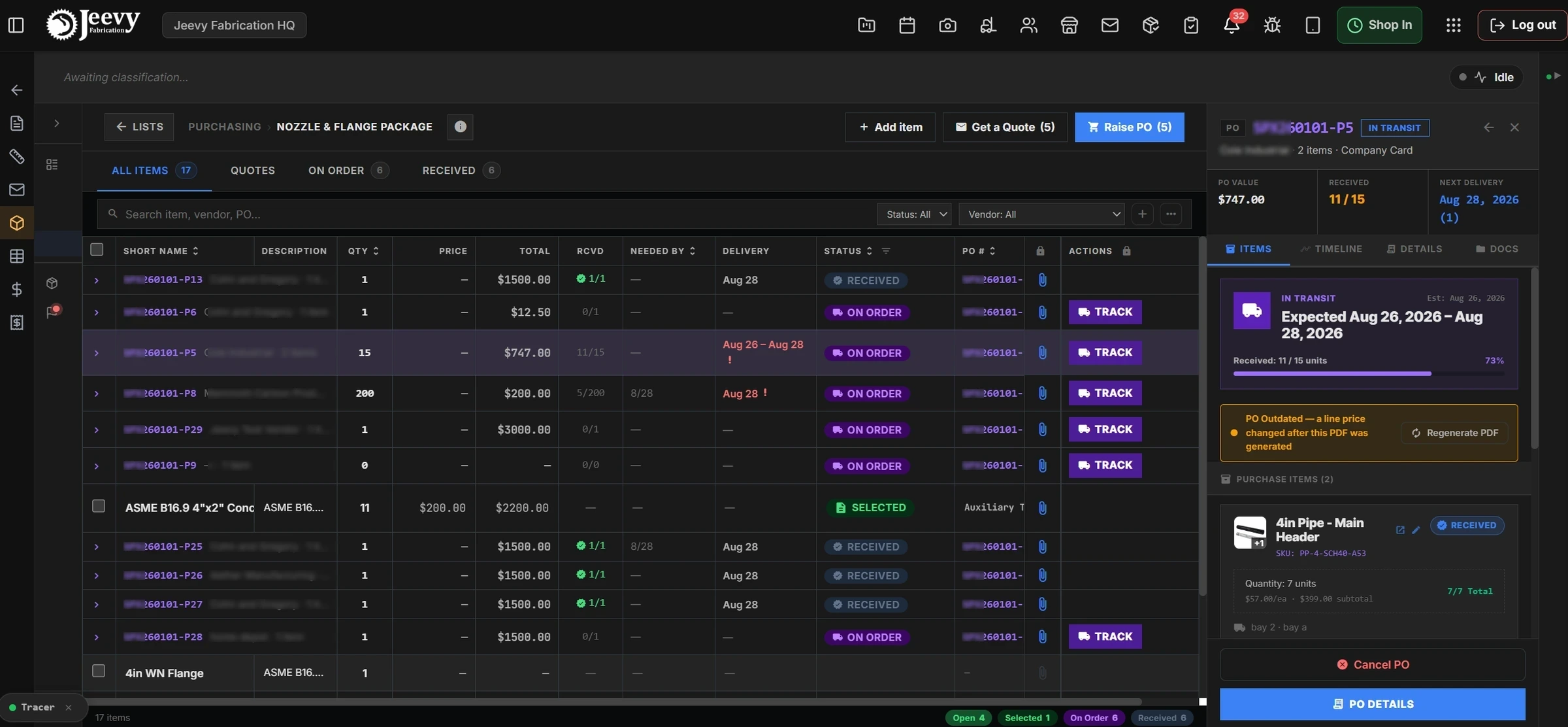
The production Materials Catalog running on our [data-ds="v1"] design tokens, featuring monotonic elevation, 36px photo thumbnails, and contextual short names.
The spreadsheet that ran a rocket-part facility
In industrial fabrication, inventory isn’t an abstract eCommerce SKU. It’s eight-inch Schedule 40 carbon steel pipe, forged 304L stainless weld-neck flanges, and cryogenic ball valves built to hold 3,000 PSI on an aerospace launchpad.
When I arrived at our heavy fabrication facility in Cleburne, Texas, our primary tool for managing high-value bills of materials was a fragile 15-tab Google Sheet. It tracked $800,036.25 in raw materials across structural steel, process piping, instrumentation, and wiring.
The spreadsheet was breaking under real shop velocity.
Formula fragility. A single typo in a cell formula silently wiped out projected margins on a $500k skid assembly without leaving a change log.
Manual transposition. Sourcing specialists spent two days copying part numbers from engineering drawings into spreadsheets, then re-typing those exact lines into supplier emails and Slack messages.
The dock disconnect. When steel arrived on a freight truck, the receiving crew tracked what came off it on dry-erase whiteboards. Front-office estimators had zero visibility into whether critical pipe was in the yard or still stuck on a highway.
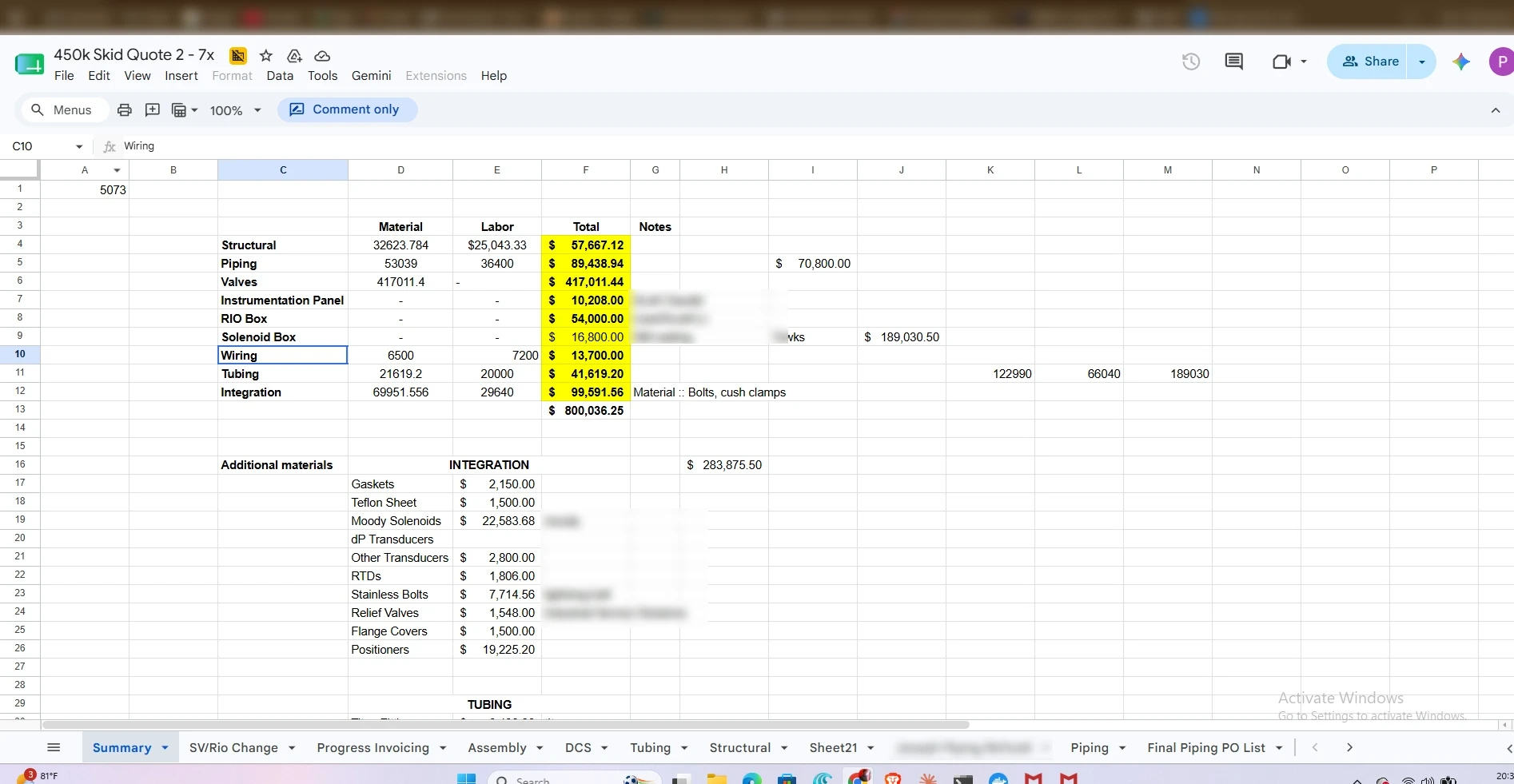
The baseline $800,036.25 quoting sheet showing disconnected formula tabs, manual splits, and un-audited cost adjustments.
The legacy web interface was an unstable 1,078-line React monolith that made things worse. It had no approval controls: any user could click Generate PO and commit company capital with zero sign-off.
Even worse, the project expenses tab was querying a deprecated table, permanently displaying $0 material spend across active jobs while hundreds of thousands of dollars were in flight.
Estimators buy a single 6'×8' parent plate to cut four small child parts on the laser. We need to track what's left over as real shop stock, not scrap.
Trevor Goldston · Shop Operations Lead
Material lists scroll is confusing. The part numbers get cut off, and the quote button just downloads a CSV instead of actually helping us compare vendor bids.
Vinay Konuru · VP Technology
If 2 flanges arrive dinged in a crate of 20, I can't reject the whole delivery. I need to take the 18 good ones into stock now and quarantine the bad 2.
Cleburne Dock Receiver
A single cell reference error in the Google Sheet distorted margins across the whole skid. We need the database to reject unapproved PO issuance structurally.
Sai Tangudu · Engineering
The ledger dictates the user experience
Rather than treating procurement as an isolated back-office task, Vinay Konuru (VP Technology) and I mapped it as a five-stage operational pipeline: recording, pricing, purchasing, tracking, and receiving.
To eliminate relational desynchronization between office purchasing and dock receiving, I designed manual_material_items, roughly 90 columns, as the single authoritative ledger. Instead of mutating rows destructively on edits, every event appends to an audit trail.
The procurement pipeline. Spend governance is resolved on the server, so the $1,000 threshold cannot be bypassed by a client that decides not to ask.
Two state machines, one author of truth
To stay compatible with legacy accounting scripts without allowing state drift, I engineered a dual state machine. The modern engine (qs_state) is the sole author of truth; the legacy machine (status) is an automatic, read-only database trigger projection.
| Modern state | Projected legacy | Database guard | Operational intent |
|---|---|---|---|
| needs, sent, opts, sel | DRAFT | Applied only if the legacy value is not already terminal. | Pre-commitment demand; no money committed. |
| approval | DRAFT | po_number forced NULL by check constraint. | Pending sign-off reads as uncommitted to accounting. |
| po | PO ISSUED | Unconditional. | A legal purchase commitment exists against a vendor. |
| purch | RECEIVED | Skipped if the legacy status is INVOICED. | Physical dock receipt cannot overwrite financial settlement. |
Server-enforced financial governance
Governance cannot be hardcoded into client JavaScript. A single-bay shop and a multi-line fabrication facility carry different risk appetites, so we architected spend governance as a facility property resolved on the server at request time, ranging from $250 to $10,000 and above.
Zero-lock fallback. A shop with no configured limit defaults to $1,000, never to NULL and never to zero.
Atomic check constraint. We wrote chk_mmi_approval_no_po_number directly into PostgreSQL. A row in approval state is physically blocked by the database from holding a PO number, which stops rogue API calls or scripts from generating binding legal orders.
Draft versus legal PO split. Orders pending review carry ephemeral DRAFT-<vendor>-<seq> identifiers. Permanent legal PO numbers are only minted on formal authorization.
Approval re-gating. If an estimator raises a price on an unreceived PO and pushes total spend past $1,000, approval is instantly revoked, fresh draft IDs are minted, and an amber PO Outdated banner blocks execution until it is re-authorized.
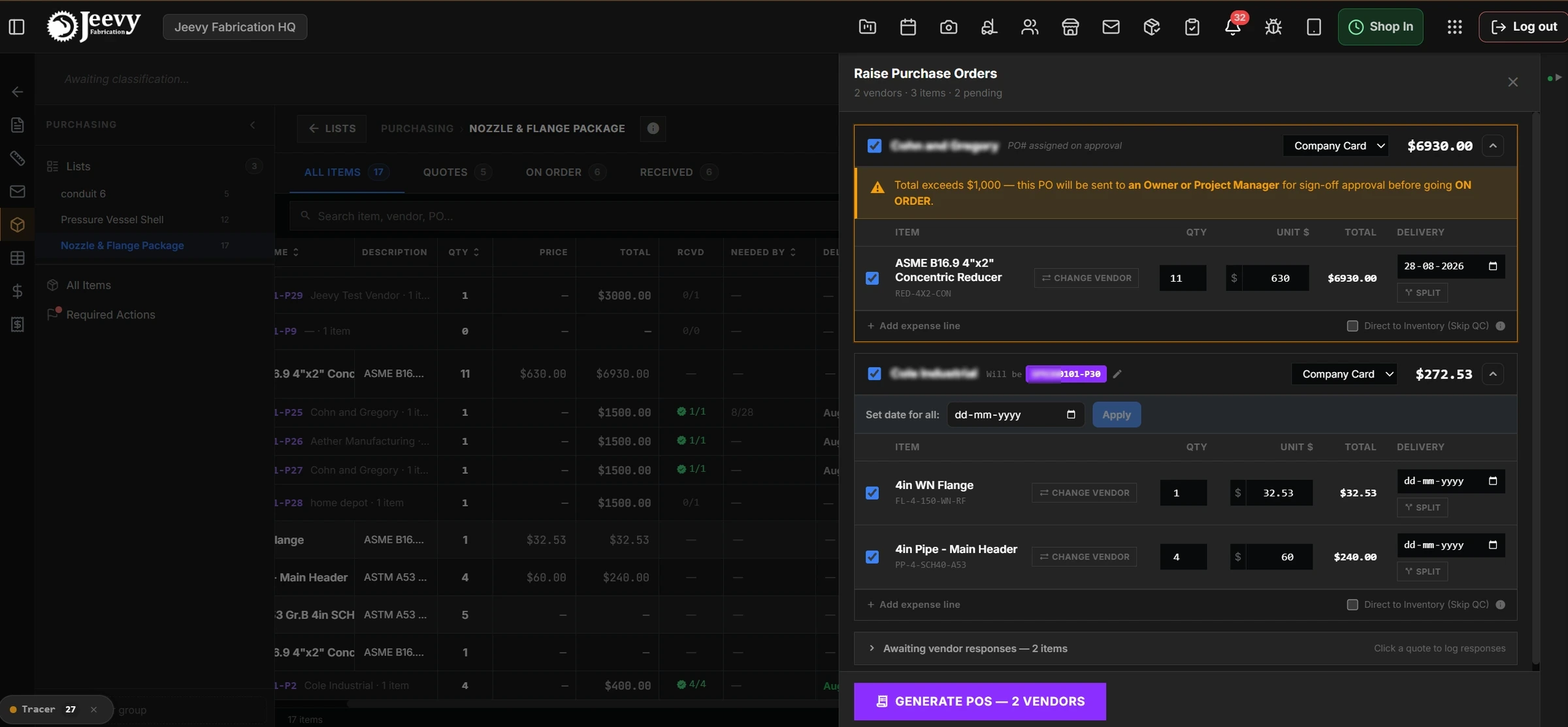
The Raise PO Drawer evaluating vendor-grouped line totals and rendering the active $1,000 sign-off warning banner.
Designing for grease, gloves, and heat numbers
Receiving steel in a fabrication hangar is chaotic. Trucks arrive unannounced, drivers wait on cranes, and workers operate tablet touchscreens with greasy hands.
I designed the 4-step QC wizard to turn dock check-in from a 30-minute clerical slog into a 3-minute physical inspection flow.
Unit-batch lot splitting. If 20 pipe flanges arrive and 2 have damaged sealing faces, the inspector checks 18 passed units into stock and routes 2 damaged units to quarantine in a single atomic transaction.
Direct to inventory. Off-the-shelf commercial goods (bolts, tape, paint) bypass the QA queue with a single toggle, immediately generating an AUTO_DIRECT_RECEIPT audit record and satisfying forward Gantt CPM scheduling ↗ constraints.
Bin allocation and digital sign-off. Inspectors log physical warehouse coordinates and sign on a high-contrast digital signature canvas.
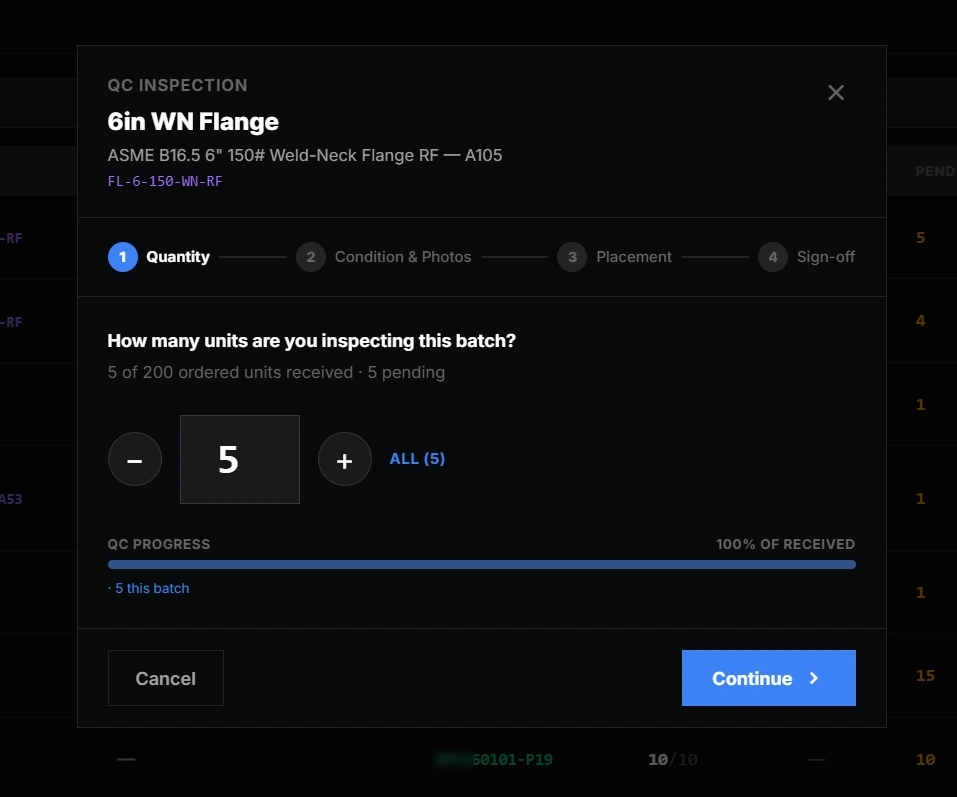
Step 1 of the QC Wizard: unit-batch inspection allocation allowing partial lot check-ins without orphaned line items.
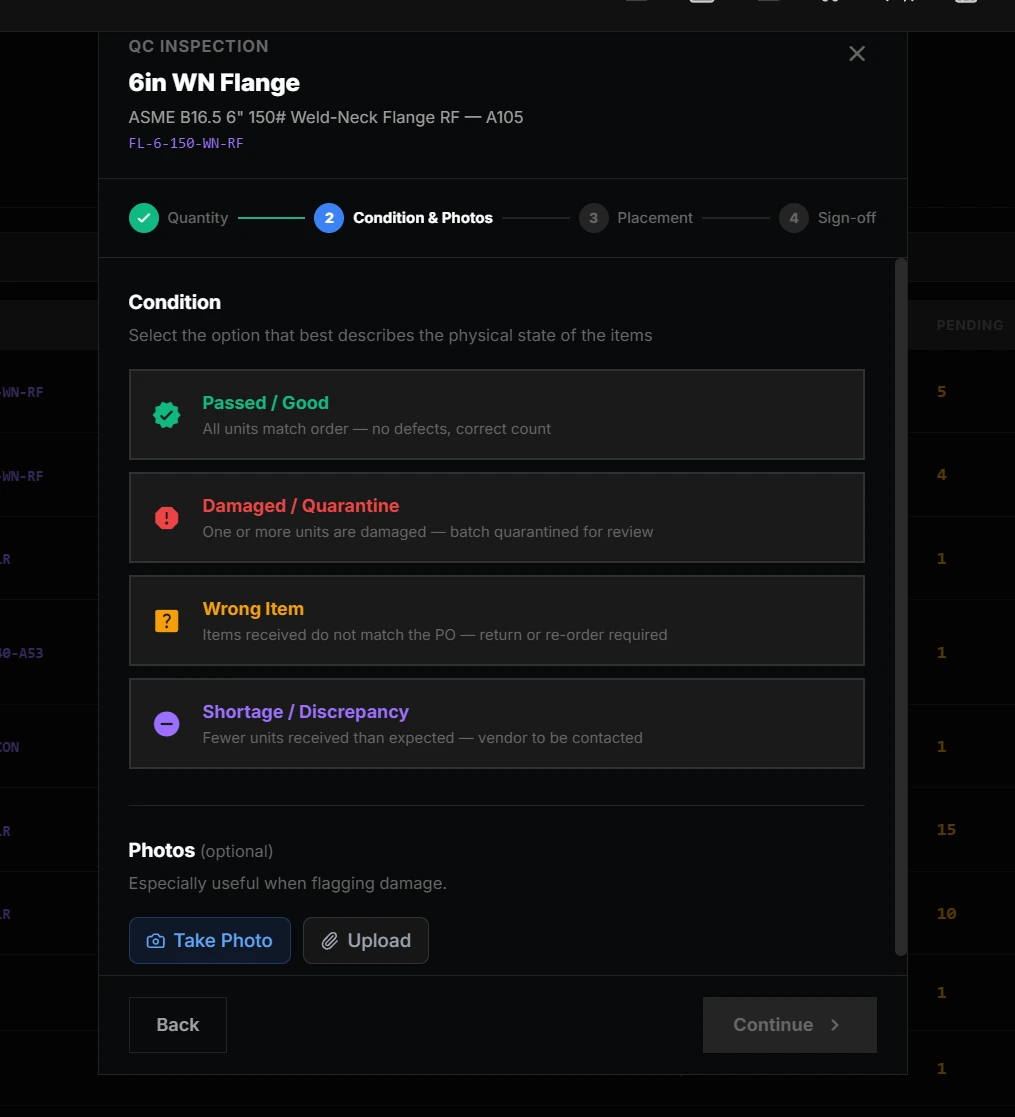
Step 2 of the QC Wizard: structured defect categorization with photo attachments for vendor damage claims.
5-column linear inventory and 1-to-N plate nesting
Legacy MES systems bury stock inside multi-level accordion trees. I replaced this with a flat, five-column linear registry: item and part number, location, available quantity, project or stock, and action.
Automated FIFO consumption. Clicking Consume decrements stock from the oldest qc_log lots first while incrementing consumed_qty, which preserves the inspection history rather than overwriting it.
Whole-PO void protection. The system blocks PO cancellations once units have been consumed on the shop floor, enforcing append-only negative adjustments so the audit stays valid.
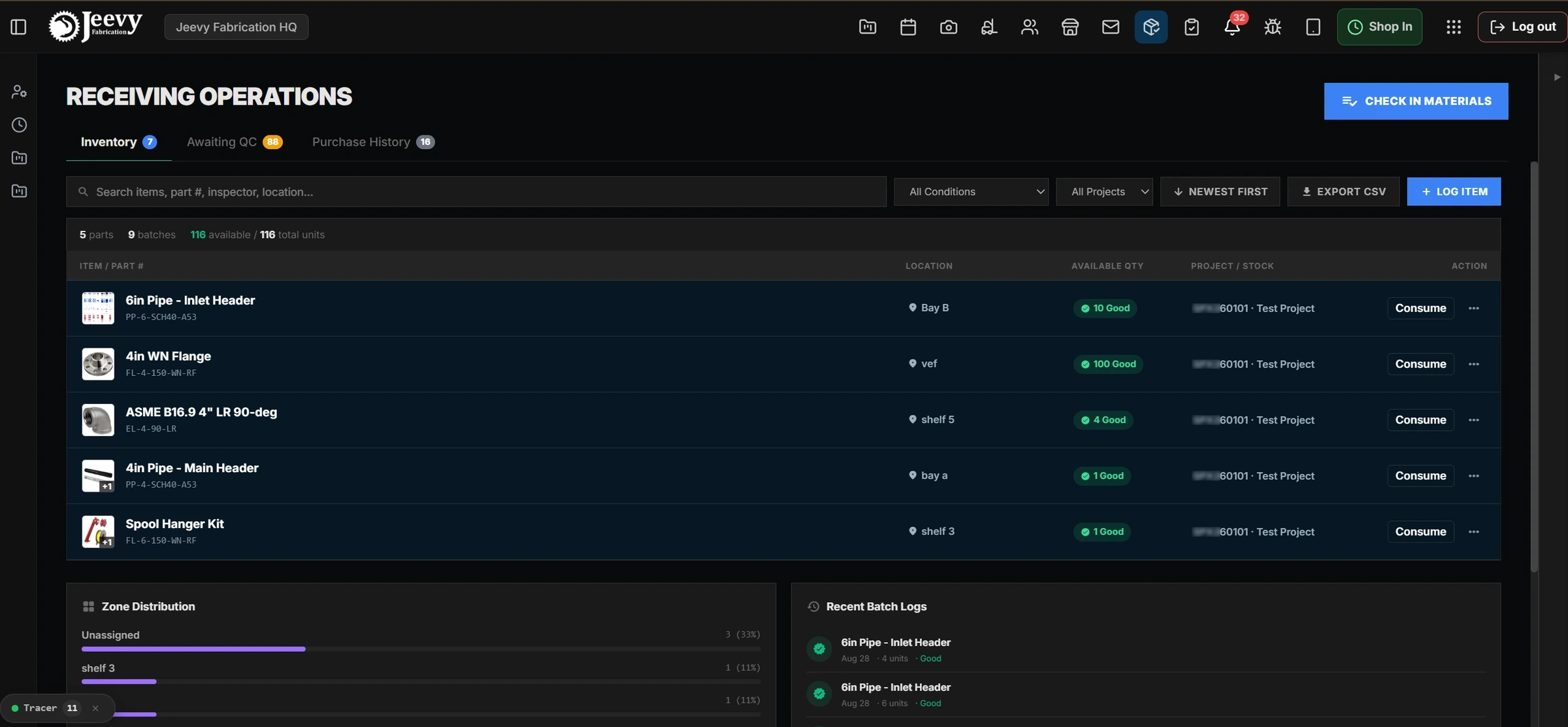
Production linear inventory table with 36px photo thumbnails and single-click FIFO stock consumption.
During on-site reviews with Trevor Goldston, I watched estimators calculate plate cutting layouts on scratch paper, ordering a single 6′×8′ raw plate to fulfil four smaller child parts.
I architected the 1-to-N bulk parent cut model. Sourcing managers select child BOM cuts, choose a parent stock plate, and receive an automated nesting preview at 78.4% utilization.
When the plate arrives, the system allocates the child parts to the job while logging the remaining 21.6% remnant sheet directly into shop inventory for future projects.

Bulk sourcing interactive workflow calculating nesting utilization (78.4%) and tracking projected remnant plate offcuts.
Scaling to partner shops without code forks
The real test of systems architecture was deploying Jeevy OS to our second partner manufacturing plant. Their shop coordinator needed a dedicated drawing callout and location column to link part rows directly to title-block coordinates on aerospace blueprints.
Rather than running brittle SQL schema migrations for every unique partner requirement, I engineered a Notion-style dynamic property engine backed by PostgreSQL JSONB column maps and atomic RPCs.
Zero-migration extensibility. Shop managers create, rename, and reorder custom columns on the fly, across eleven typed fields: text, number, select, person, date, checkbox, URL and more.
Contextual short names. The importer parses human-readable nicknames on CSV import, so a row reads 4in Pipe Inlet Header rather than a 40-character ASTM specification.
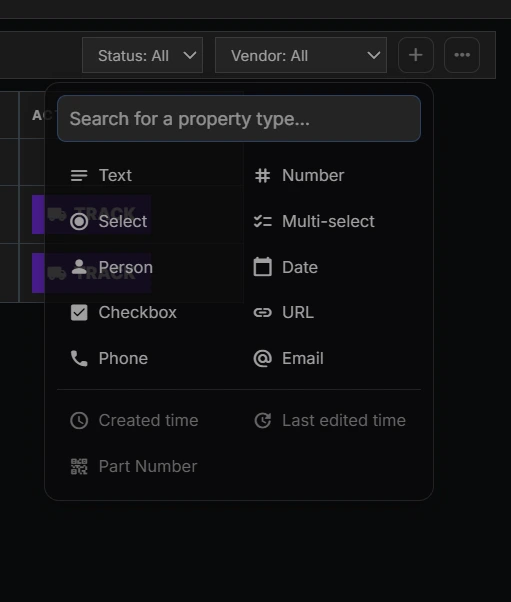
In-place Notion-style custom property creation supporting 11 dynamic field types backed by PostgreSQL JSONB maps.
Systems reflection and executive reception
Building the materials engine solo proved that enterprise UX cannot be separated from database constraints. By enforcing append-only single-table ledgers, dynamic spend limits, and 4-step dock QA, BOM-to-RFQ turnaround dropped from 48 hours to under 12 minutes, and rogue spending was eliminated outright.
Verified Outcomes
- 96% turnaround reduction. BOM-to-RFQ generation dropped from ~48 hours across 15 Excel tabs to under 12 minutes via anchored popovers and formatted TSV drafts.
- Zero unapproved spend. Server-side $1,000 spend gating backed by PostgreSQL check constraints (chk_mmi_approval_no_po_number), permanently separating draft IDs from legal PO numbers.
- 100% floor traceability. 4-step unit dock QC with lot splitting cut receiving from 30 minutes to 3, while preserving full Material Test Report heat-number provenance for aerospace client QA.
- Multi-shop scalability. Deployed to Partner Fabrication Facility A with zero codebase forks, using Notion-style custom columns and 1-to-N raw plate nesting at 78.4% utilization.
“I just want to share the good news with you… It really feels good when somebody gets to finally start using the software. Someone is actually going in every single day to start using the thing that you built.”
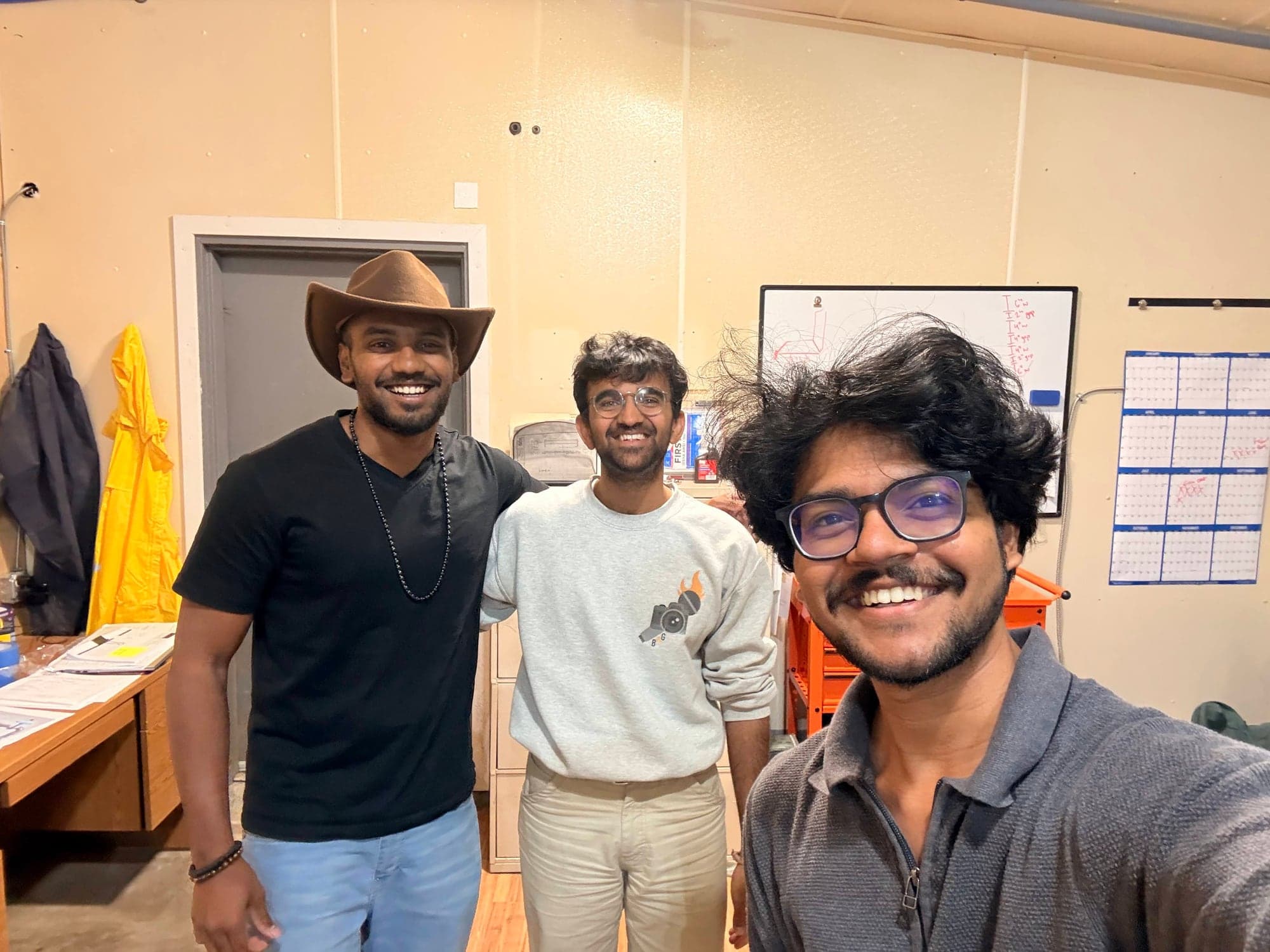
Vinay Konuru (VP Tech), Sai Tangudu (Engineering), and Pradeep Y. on-site in Cleburne following the materials release.