Designing for the Human Holding the Welding Torch
How I transformed an un-opinionated two-button clock-in wrapper into an asynchronous shop-floor feedback engine with ephemeral PIN sessions, dual-clock frozen break arithmetic, tri-state blocker escalation, and a 275-key zero-drift bilingual contract.
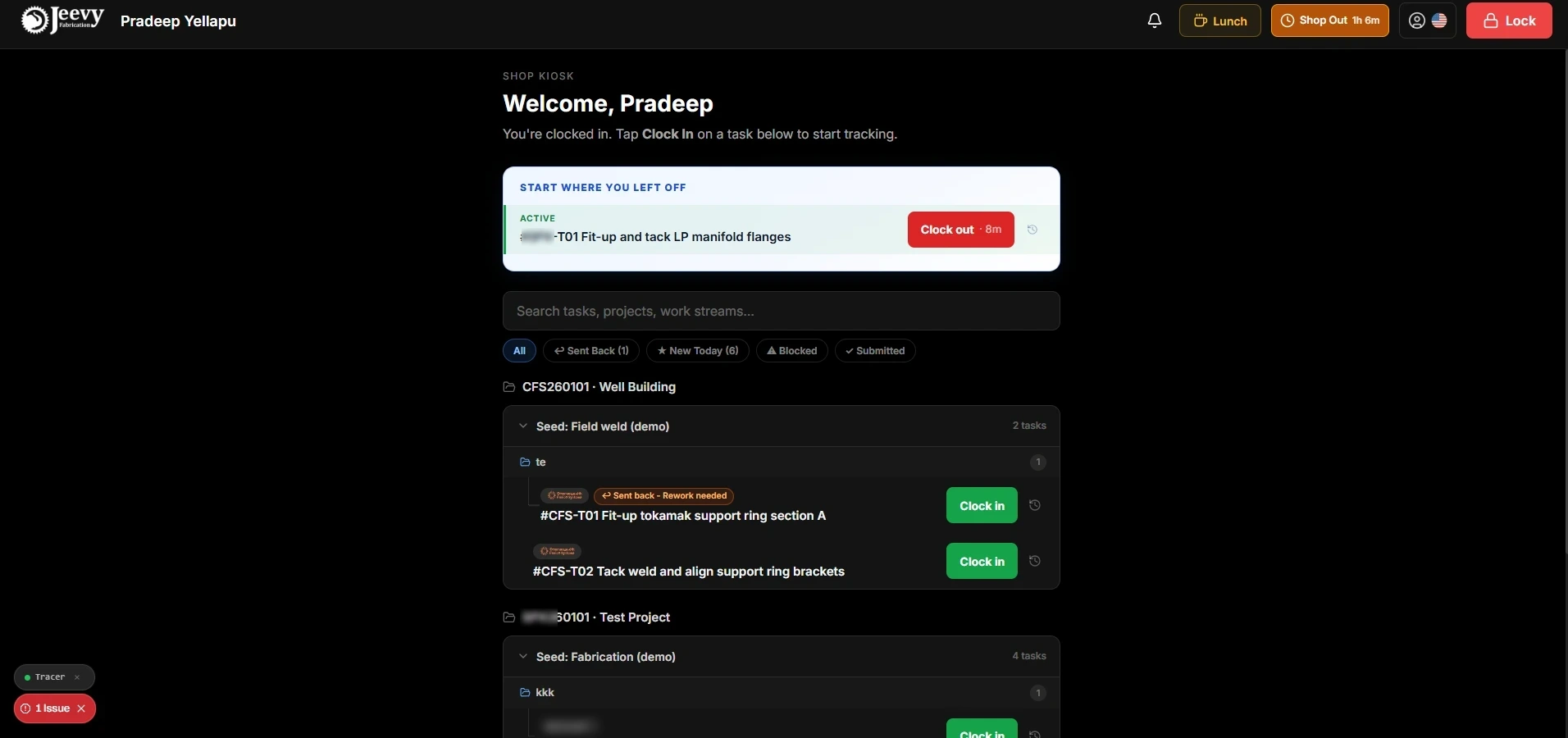
Production worker dashboard displaying the active task banner, elapsed timer, Lunch break trigger, and category filters.
The illusion of simple time tracking
When enterprise software vendors design manufacturing software, they default to a binary model: an employee is either clocked in, or clocked out. Nothing in between is expressible.
When I arrived at our Cleburne fabrication plant, the terminal running on our shop floor was a bare two-button wrapper. It was built for back-office payroll compliance, but as an operational tool it was broken.
The finished-task dilemma. When a welder finished a four-hour root-pass weld on a cryogenic pipe spool, there was no completion button. The task stayed open until a supervisor noticed, leaving active work indistinguishable from tasks nobody had touched.
Silent material starvation. When fitters ran out of structural gussets or discovered misaligned flanges, they walked away. The timer kept running against the job budget, poisoning job-costing takeoffs while the physical blocker lived only in the worker’s head.
Unpaid lunch distortion. If a welder took a 45-minute unpaid lunch during a weldment, the legacy system added that time directly into fabrication labor, falsely reporting artificial inefficiency to management.
The monolingual wall. The entire system was English-only, creating daily hesitation and translation overhead across a predominantly Spanish-speaking welding crew.
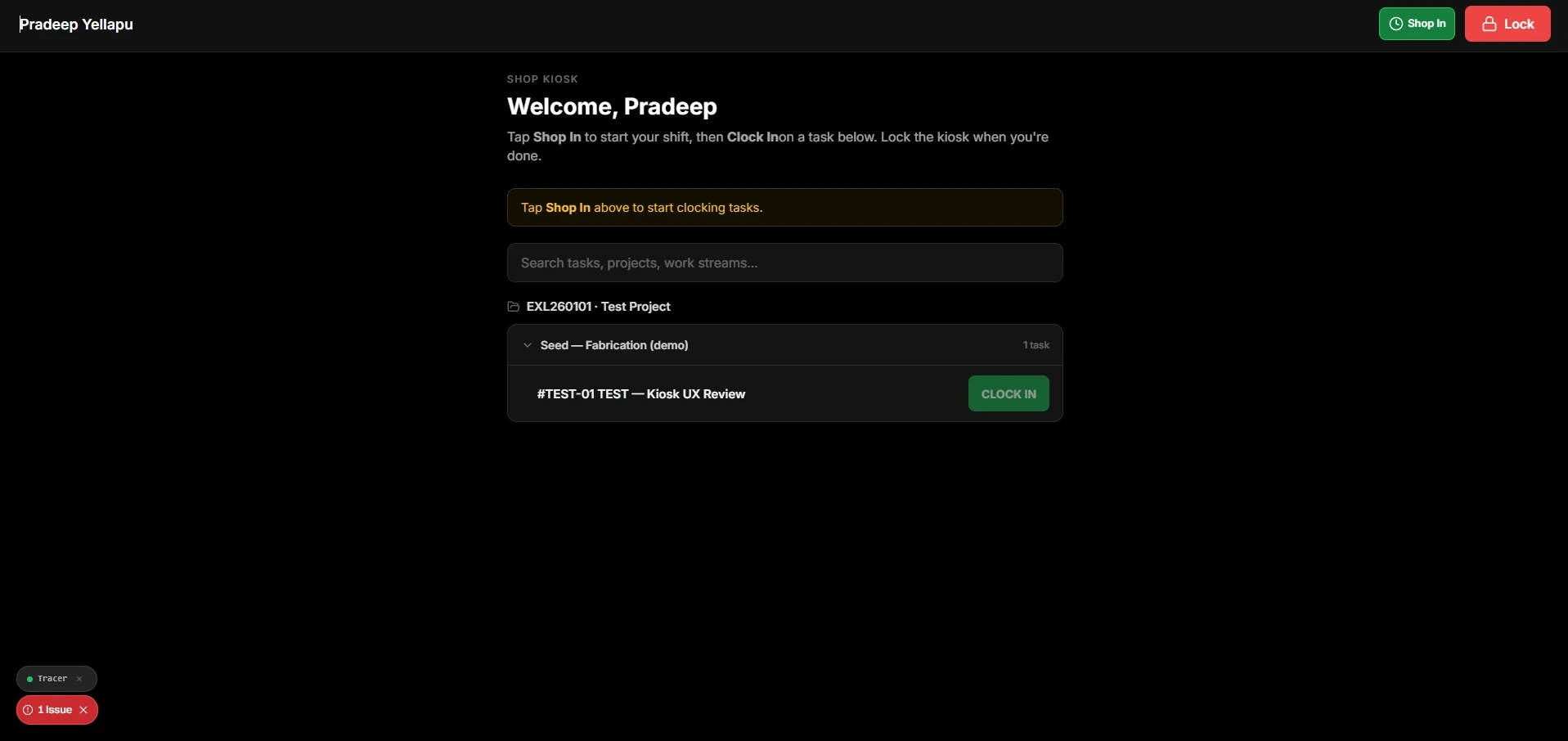
The legacy two-button kiosk baseline: zero task categorization, no shift context, and no digital escalation path.
What we heard in the welding bays
I spent two weeks running contextual inquiries in the active welding bays, watching how operators handled pipe spools, heavy gauntlets, and paper weldment travelers under metal-halide glare.
Welders shouldn't have to take off heavy gloves, walk 200 feet across the hangar, or call around just to report a completed joint or ask for crane support.
Project Manager · fabrication
I clock in every day, but I never know what hours actually got recorded until Friday. If there's a payroll discrepancy, it turns into an argument after the fact.
Weld Operator · pipe
In heavy fab, you're always jumping in to help fit a multi-ton frame. If I can't clock in to another guy's task, the system treats me as idle and PMs question my productivity.
Weld Operator · steel department
When we run out of flanges or gussets, there's no way to put a task on hold. We end up clocking in and out aimlessly, with blocked jobs cluttering the terminal screen.
Lead Fitter · pipe
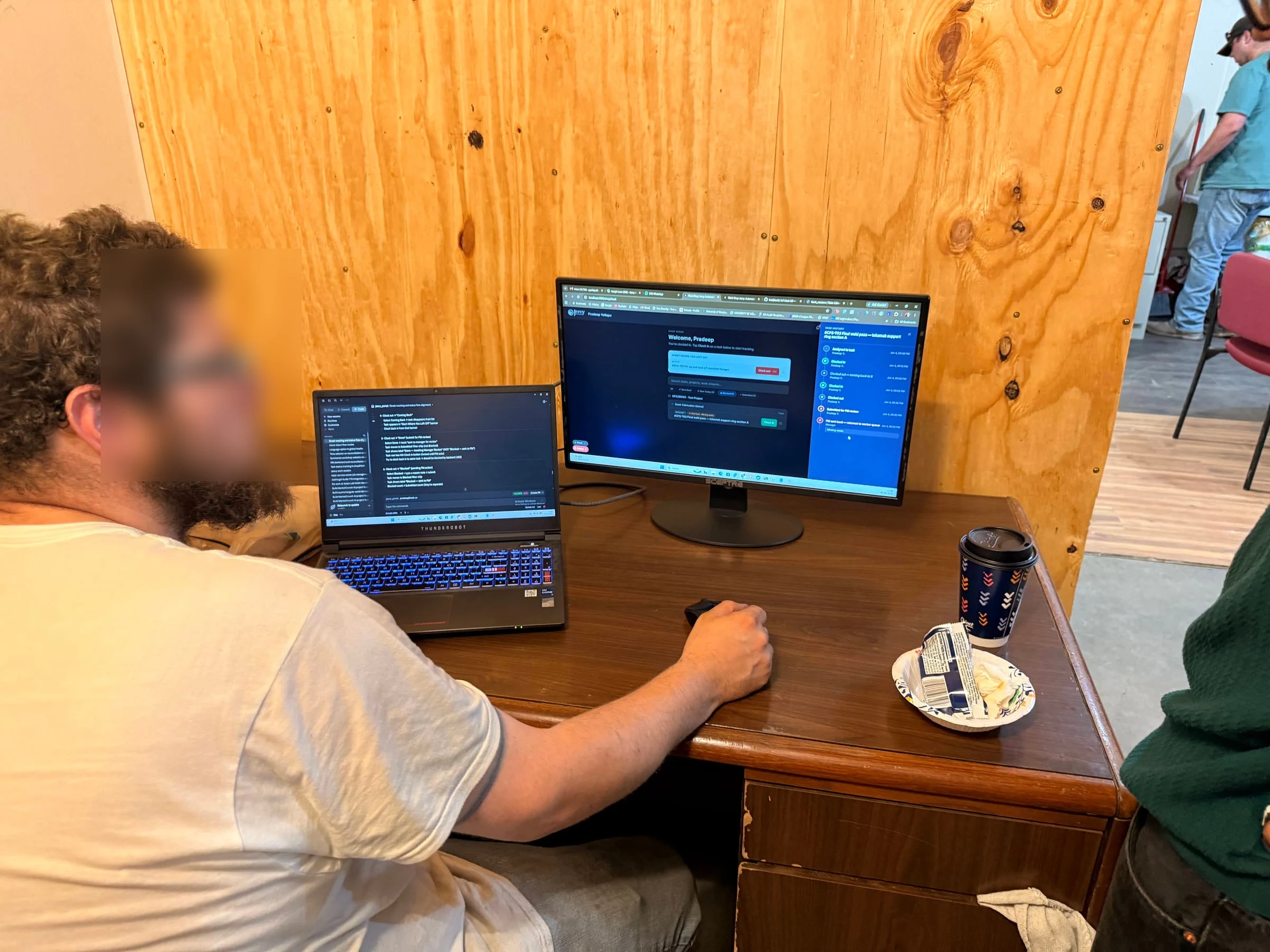
Usability validation session with shop-floor crew testing 6-digit PIN entry and shift reconciliation flows.
Dual-clock architecture and ephemeral PIN identity
To support dozens of rotating workers sharing rugged tablets mounted to structural steel columns, I engineered a dual-layer architecture kept deliberately separate from corporate SSO.
The split took a while to find. My first sketches tried to keep one clock and infer the rest, and it fell apart the moment a worker was on site but between jobs.

Early low-fidelity wireframe exploring the split between Shop In and local Task Clock-In, including end-of-shift reconciliation.
Shop presence and direct task labour are recorded on two separate clocks, so a worker can be on site without a job absorbing their time.
Ephemeral PIN authentication. Workers authenticate with a 6-digit PIN mapped to an ephemeral session. The server invalidates tokens on inactivity timeout or shift checkout, which is what prevents one worker’s hours landing under another’s name on a shared terminal.
The dual-clock time model. Fabrication accounting separates physical site presence from active fabrication labor. A database-level unique index on (shop_id, personnel_id) guarantees no operator can hold multiple concurrent sessions.
Atomic break arithmetic. Tapping Lunch freezes the on-screen task timer immediately. When the worker returns, the counter resumes from the exact pre-break minute: 40m stays 40m through lunch and resumes at 41m. On the backend, gross elapsed time minus break overlap yields net labor.
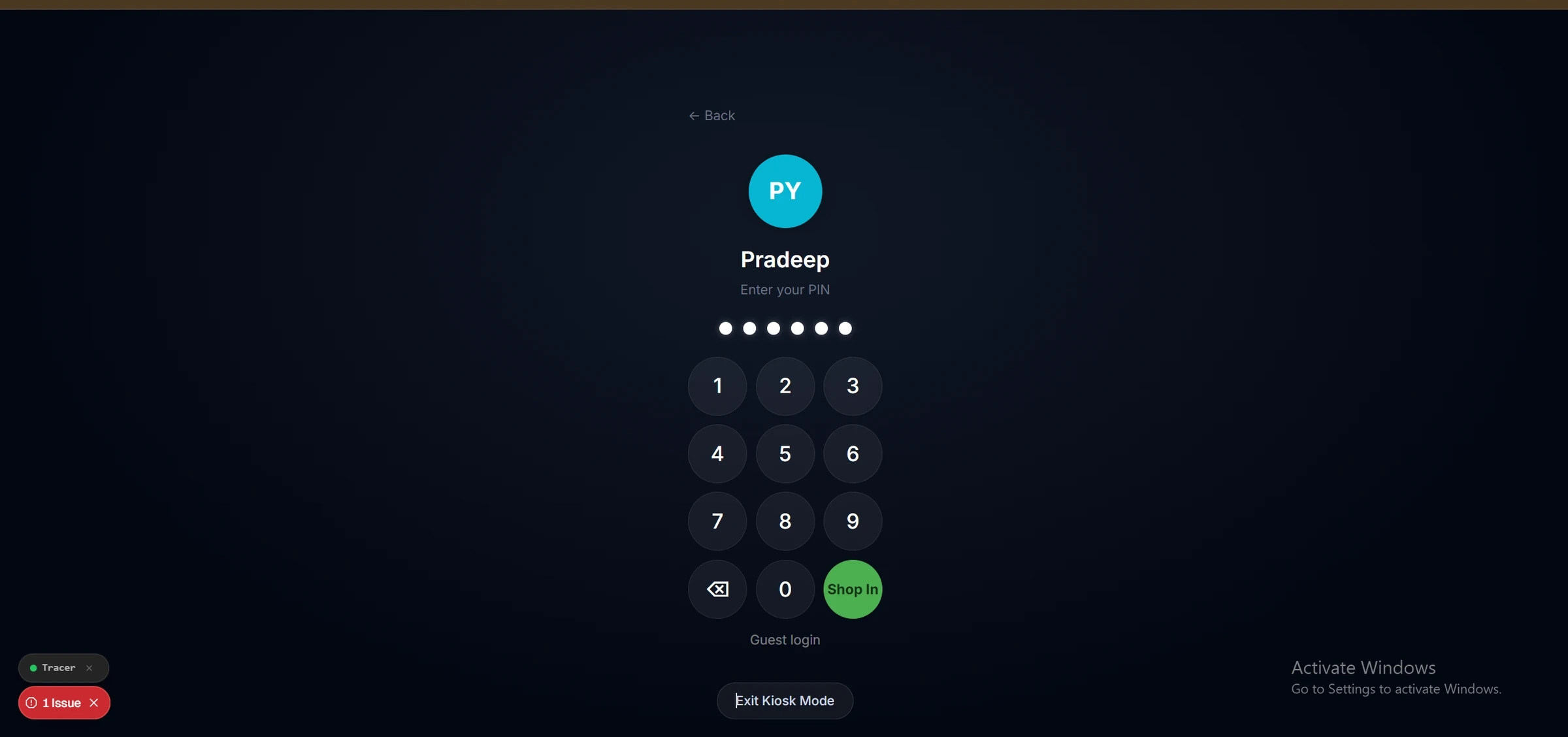
Production PIN keypad featuring high-contrast 64px circular touch keys with 44px invisible hit-target contracts.
Tri-state task resolution and blocker escalation
Clocking out of a task triggers a tri-state exit modal that replaces shouting across the bay with structured digital escalation.
Done. Routes the task to the PM review queue for supervisory inspection and marks the item ready for client QA.
Coming back to it. Keeps the task assigned to the worker and pins it to the “start where you left off” banner at their next login.
Pending. Requires a structured explanation note, say missing 4x gusset plates from the cutting table. The system halts the labor timer, flags the task, and sends a live escalation straight to the project manager’s queue. Those notes are what feed the material gates in the materials ledger ↗.
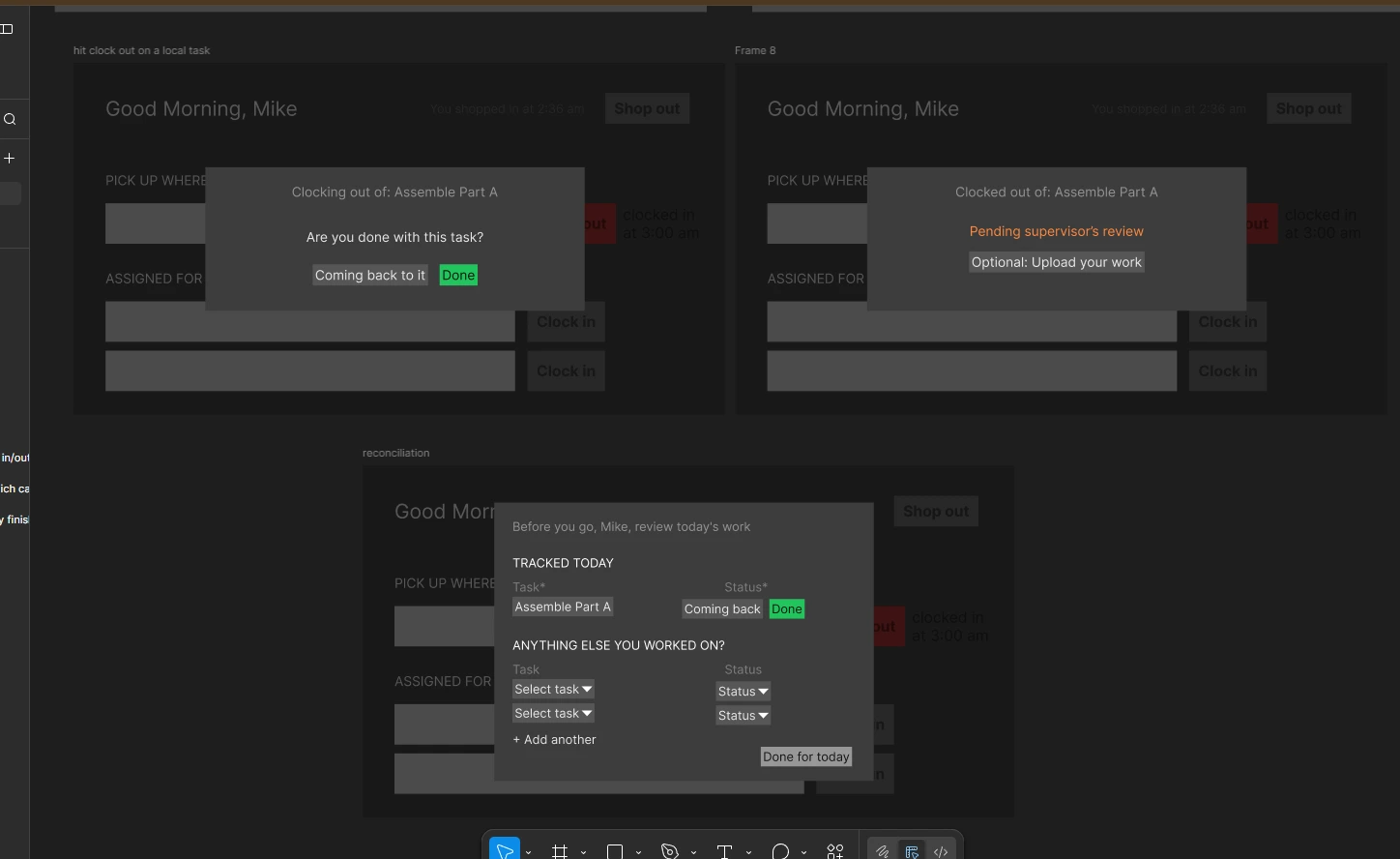
Wireframe establishing the tri-state feedback exit modal, where the choice a worker makes on the way out becomes the escalation signal.
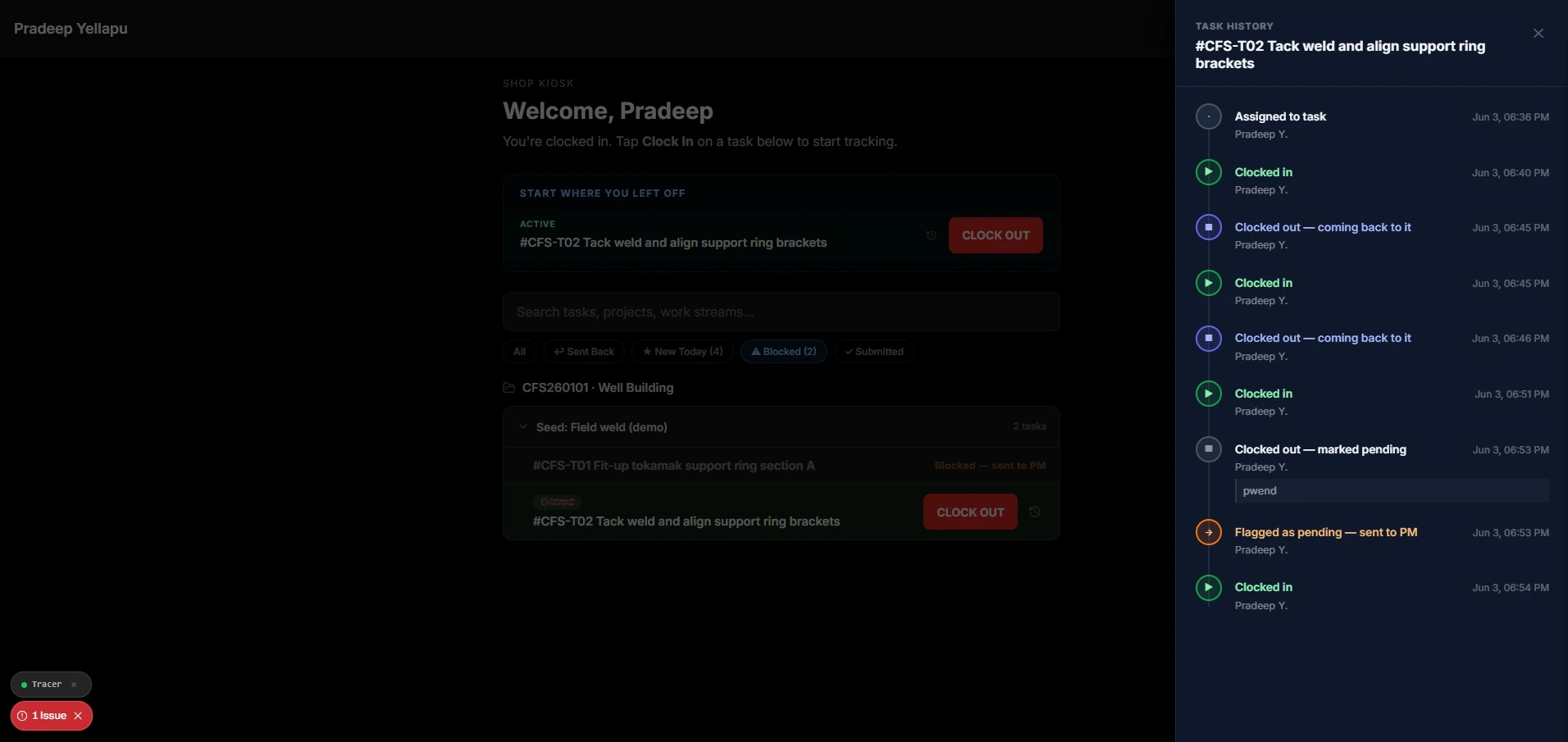
Immutable task history drawer auditing every clock-in, pause, and blocker note to maintain complete build provenance.
In the PM review queue, supervisors assess submitted work against preset quality failure codes: wrong spec, missing welds, needs rework, needs inspection. If a task is sent back, a push notification reaches the worker at the kiosk terminal with the supervisor’s notes attached, so the correction happens at the bay rather than at the end of the week.
Preset codes were the point. Free-text rejection reasons had been the norm verbally, and they gave the welder no consistent signal about what to fix.
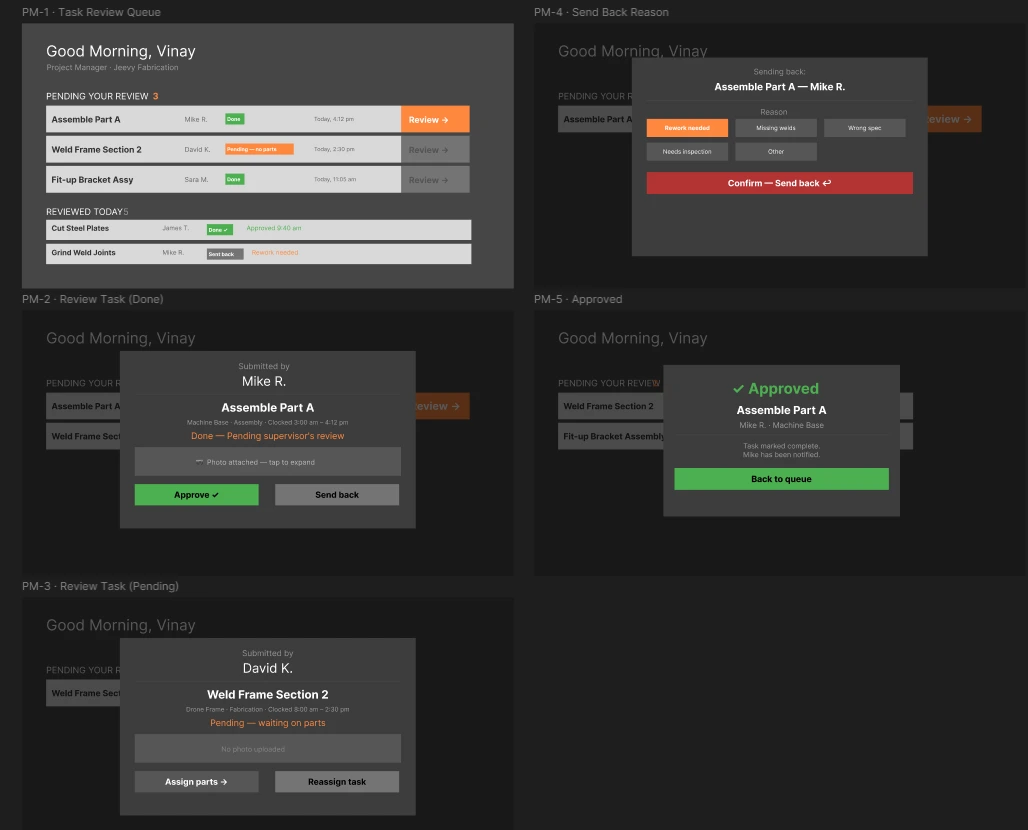
PM Review dashboard wireframe introducing preset send-back codes (Rework needed, Missing welds, Wrong spec, Needs inspection) to maintain quality standards.
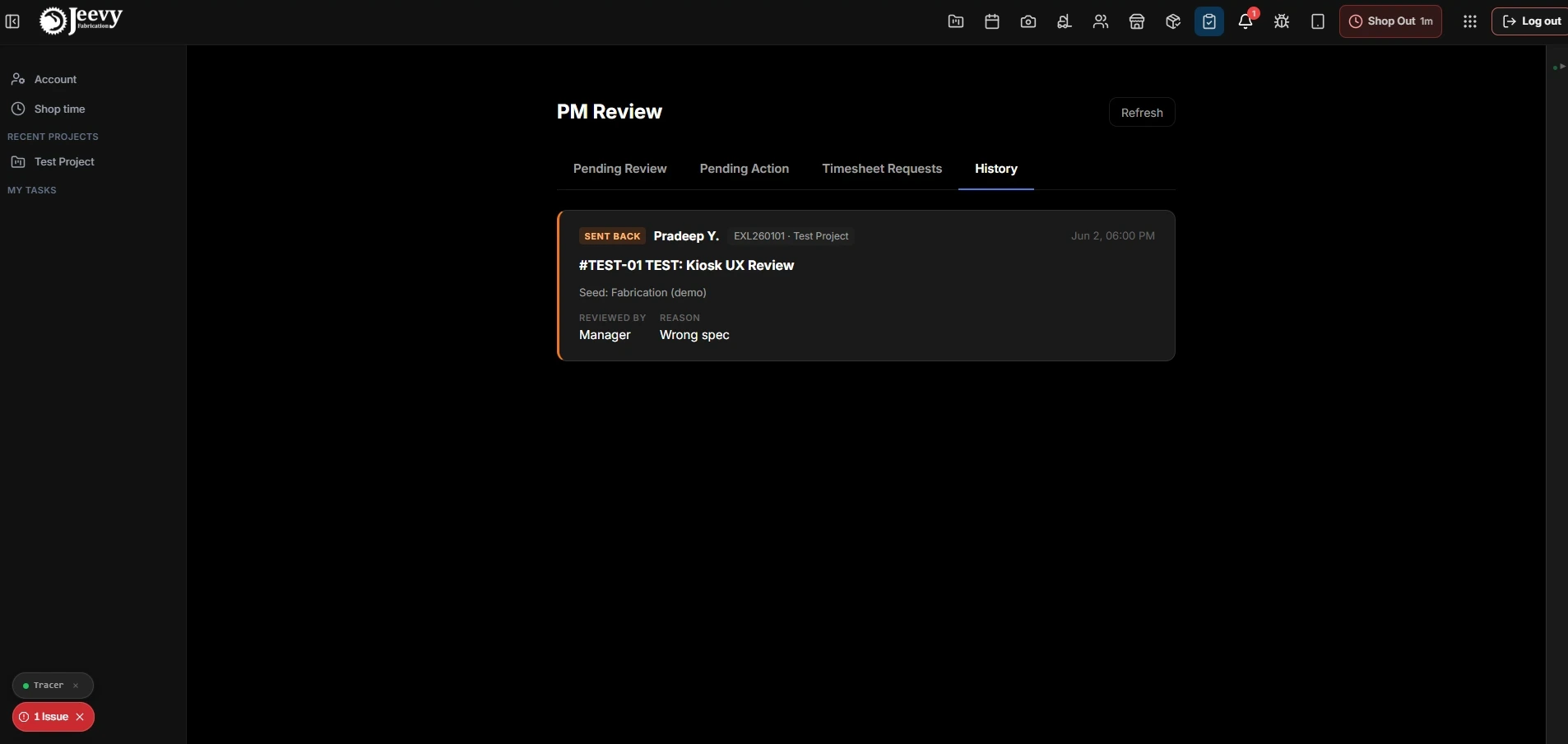
Supervisor review history auditing structured send-back reasons (wrong spec, missing welds) to enforce aerospace quality standards.
Shift reconciliation and capturing collaborative labor
In heavy structural fabrication, nobody fits a 40-foot skid frame in isolation. Welders and fitters constantly jump between bays to help hoist assemblies, clamp flanges, or lay down root passes on tasks assigned to other crew members.
In the legacy kiosk, tasks were assigned strictly one-to-one by office project managers. If a job wasn’t explicitly routed to your profile, the terminal rendered a blank empty state saying no tasks are assigned to you yet, leaving helping hands unrecorded and making workers look idle in managerial productivity reports.
I resolved this through the end-of-shift reconciliation dialog.
“Anything else you worked on?” allocation. When a worker taps Shop Out at the end of a shift, the reconciliation screen summarizes their actively tracked tasks alongside a selector for everything else.
Self-service task attribution. If a welder spent two hours helping another bay fit up a manifold, they search the project, pick the task, and log the hours directly at the terminal before final checkout.
Closing the Friday payroll gap. Reviewing this daily means cross-bay collaboration is captured in job costing at the time it happened, rather than argued about on a Friday afternoon.
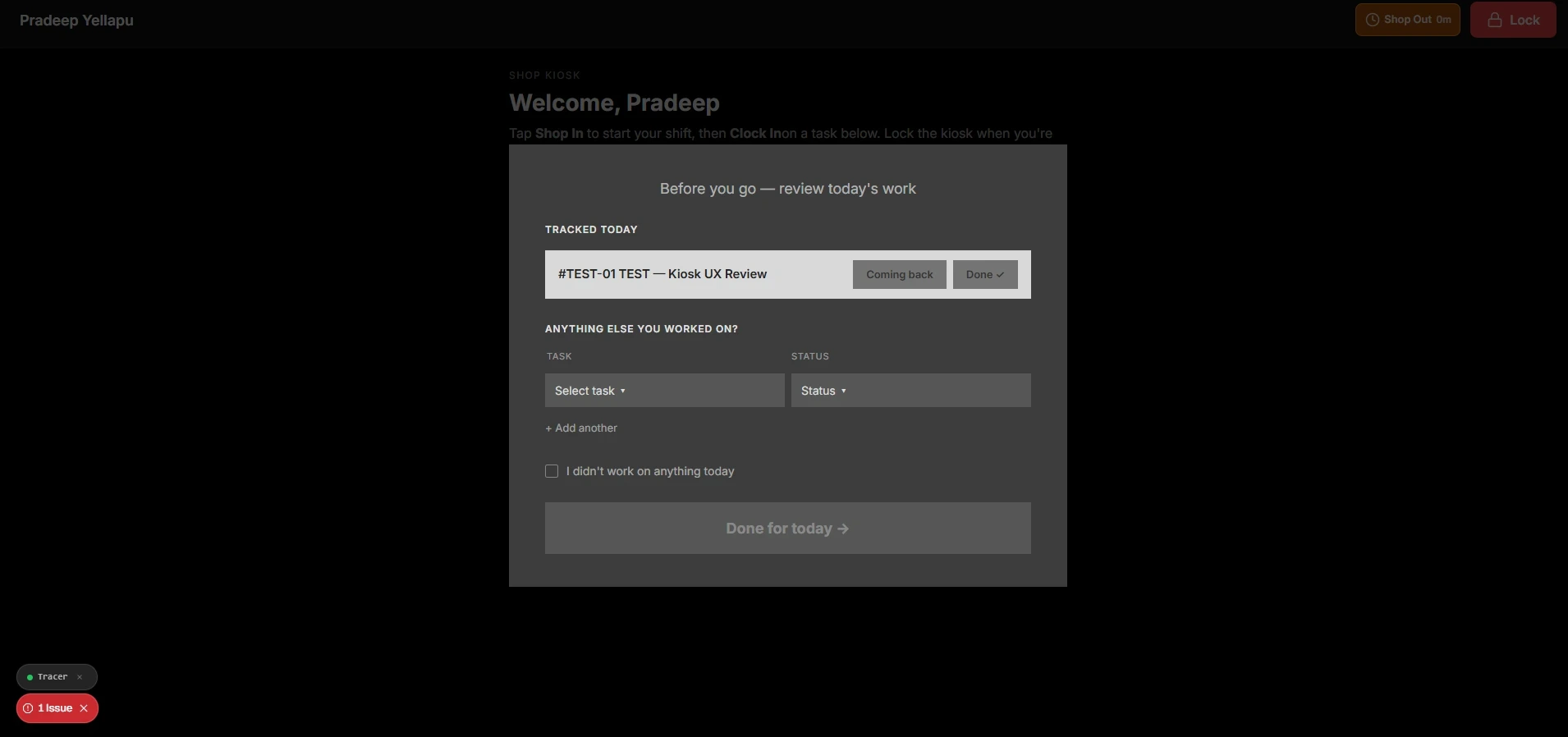
The shift reconciliation wireframe introducing the “Anything else you worked on?” selector, allowing assisting crew members to account for collaborative labor before checkout.
275-key bilingual parity and pay transparency
Multilingual support in industrial software cannot be a post-hoc translation plugin. A mistranslated weld specification is a physical safety risk, not a copy bug.
I architected a 275-key zero-drift internationalization engine across 16 functional namespaces.
Structural separation. Fixed UI tokens and state labels resolve through strict dictionaries, so Shop Out becomes Salir del taller and Lunch becomes Almuerzo, while free-form worker notes and Material Test Reports are preserved verbatim, never machine-translated.
100% key parity. A continuous build-time audit verifies zero missing keys and zero unmapped tokens between languages, so a Spanish-speaking operator never falls through to an English string mid-flow.
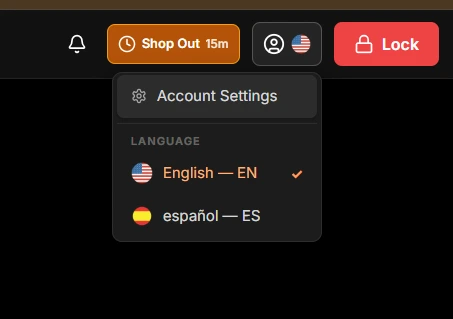
In-place language selector toggling English and Spanish across all kiosk namespaces with zero layout shift.
Workers bypass software when it functions only as a tool for managerial surveillance. To build trust, we gave them direct access to their own hours and pay from the kiosk terminal itself.
At the end of each shift, a reconciliation dialog summarizes all tracked hours and prompts the worker to account for untracked work before final checkout, which is what removed the Friday payroll arguments the pipe welder described.
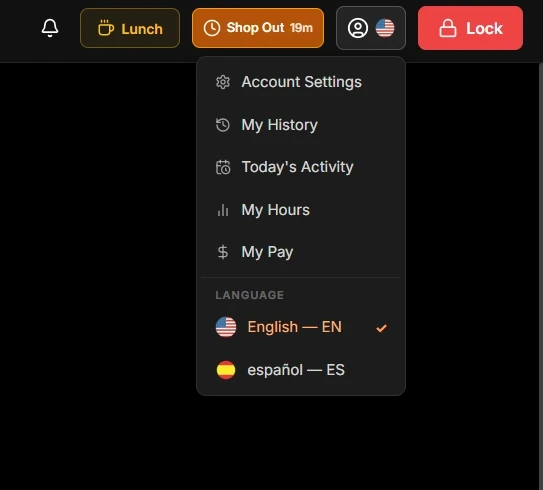
In-kiosk worker account menu exposing personal productivity metrics, shift history, and wage transparency.
Verified Outcomes
- 92% authentication speedup. Ephemeral 6-digit PIN logins cut terminal authentication from ~30 seconds to under 3, while eliminating session cross-contamination on shared tablets.
- 12-minute blocker resolution. Mandatory pending-exit notes reduced supervisory resolution lag from roughly 4 hours to under 12 minutes.
- 100% net labor accuracy. Frozen break arithmetic and database-enforced single sessions eliminated phantom fabrication costs across every active heavy industrial process skid and cryogenic pressure vessel build.
- 100% bilingual floor adoption. Complete Spanish parity removed translation errors and operational onboarding friction across the entire workforce.
Reciprocity drives compliance
Designing the shop kiosk proved that user compliance is a function of respect. When software only extracts data for management, workers route around it.
By giving workers immediate pay visibility, glove-operable touch targets, and a direct digital voice to unblock their own builds, time tracking stopped being a monitoring chore and became a tool they had a reason to use.